SSMS Claude Chat settings
Click the ⚙ gear at the top of the chat window, change what you like and click Save.
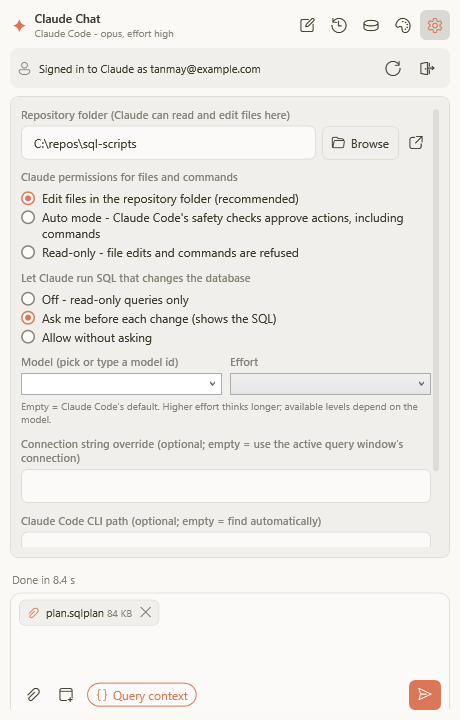
Database changes
This is the most important setting. It decides what happens when Claude wants to change your database.
| Option | What happens |
|---|---|
| Ask me before each change (default) | A box shows exactly what will run. Nothing happens until you click Yes. |
| Off | Claude can look and suggest, but never change anything. |
| Allow without asking | Changes run straight away. Only use this on test databases. |
Tip: Claude can only do what your SQL Server login allows. For extra peace of mind, connect with a login that has read-only rights.
Scripts folder
The folder where Claude may create and edit your SQL script files, for example the folder of your project. If you leave it empty, Claude uses a private scratch folder.
To tell Claude about your project’s rules (naming, style, which database is which), put a file called
CLAUDE.md in that folder and write them down in plain English.
What Claude may do with files
| Option | What it means |
|---|---|
| Edit files in the scripts folder (recommended) | Claude can create and change files in your scripts folder |
| Auto mode | Claude can do more on its own; a safety check blocks anything risky |
| Read-only | Claude can read but not change files |
Model and effort
- Model: which Claude to use. Opus is the smartest, Sonnet a good balance, Haiku the fastest. Leave it empty for the default.
- Effort: how hard Claude thinks, from low (quick) to max (thorough). Leave it empty for the default.
Rarely needed
- Connection string: only if Claude can’t use your query window’s connection. It’s stored encrypted for your Windows account.
- Claude Code location: only if SSMS Claude Chat can’t find Claude Code on its own.
Colours are set separately with the 🎨 theme button.