What SSMS Claude Chat can do
SSMS Claude Chat is an AI helper for people who work with SQL Server. It always works with the server and database of the query window you’re in, so you never have to explain your setup.
Answers questions about your database
Ask things like:
- What tables are in this database, and what are they for?
- Which procedures use the Customers table?
- How many orders were placed last month?
Claude looks at your tables, columns, keys and procedures to answer. When it needs data it only reads, and it can’t change anything this way.
Explains and writes stored procedures
- Explain: “What does dbo.usp_MonthlyRevenue do?” gets you a plain-English walk-through.
- Write: describe what you need and Claude writes the procedure, either in your query window or as a file.
- Run: when you’re happy, Claude can create it in the database, after you approve.
Helps fix slow queries
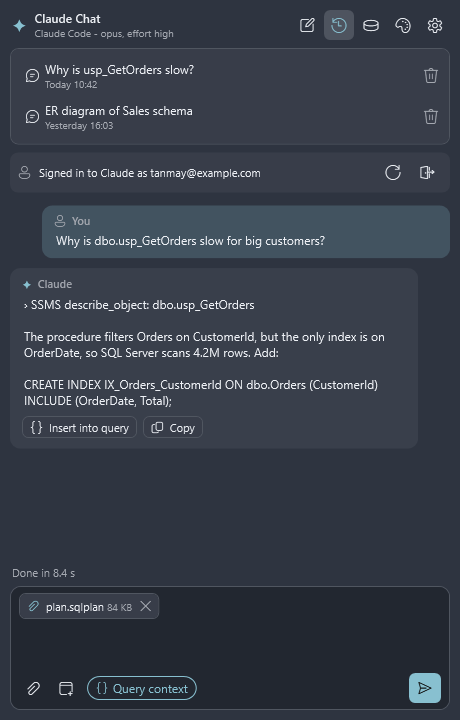
Ask “why is this slow?” about a query or procedure, or attach its execution plan (.sqlplan file). Claude
explains the cause in simple terms and suggests a fix, such as a better index or a rewrite.
Draws database diagrams
- ER diagrams in one click: the DB diagram button draws your tables and how they connect. It works across
several databases and doesn’t use any of your Claude allowance.
- Solid lines are links defined in the database.
- Dashed lines are links Claude Chat guessed from column names (for example
Orders.CustomerId→Customers.Id). Check these.
- Flowcharts: ask “draw a flowchart of this procedure” and it opens in your browser, ready to save as an image.
Never changes your database without asking
When Claude wants to run something that changes your database, such as adding a row, creating an index or changing a procedure, a box pops up showing:
- the exact SQL it wants to run,
- which server and database it will run on,
- and why.
Nothing happens unless you click Yes. You can also switch changes off completely in Settings.
Works with your query windows and script files
Claude can read and rewrite the query window you’re in (Ctrl+Z undoes it), open new query windows, and edit the SQL script files in a folder you choose.
Attach files and screenshots
Click the paper clip to attach SQL scripts, execution plans, log files, spreadsheets (CSV), images or PDFs. You can also drag files in, paste with Ctrl+V, or click Screenshot to snip part of your screen.
Remembers your conversations
Every chat is saved. Open History to pick one up again; Claude remembers what you talked about.
Choose the Claude model
In Settings you can pick which Claude model to use (faster or smarter) and how hard it should think.
Works with any SQL Server login
SSMS Claude Chat uses the same connection as your query window, so Windows logins, SQL logins and Microsoft Entra (Azure AD) logins all work. Claude can only see and do what your login is allowed to.